|
Wizards / Panel Data Regressions Wizard |
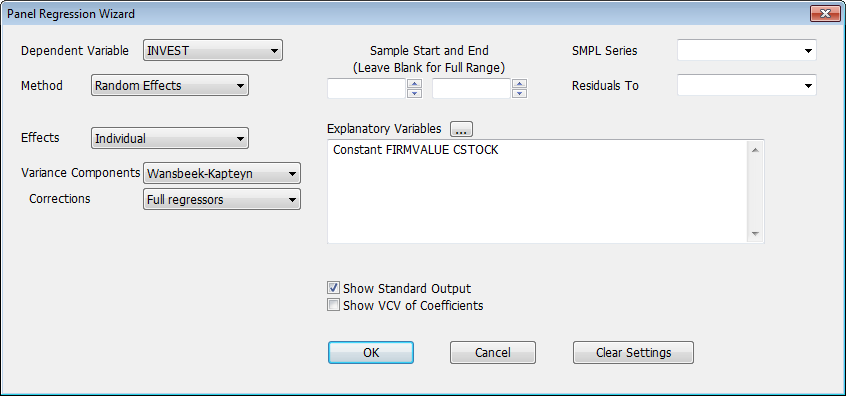
Selecting Panel Data Regressions on the Statistics menu provides an interface to the PREGRESS instruction for doing panel data regressions. Selecting the Wizard brings up a dialog box like this:
Dependent Variable
Use this pull-down list to select the dependent variable for the regression.
Method
Use this pull-down menu to select the estimation method. The choices are "Fixed Effects", "Random Effects", "First Differences", "SUR", "Between" and "Pooled".
Sample Start and End
Use these fields to set a specific starting and/or ending date for the estimation.
SMPL Series
Use this option to select a series to be used for the SMPL Option.
Residuals to
You can use this field to store the estimated residuals to a series. You can type in a new name, or select one of the existing series from the drop-down list.
Effects
This box is visible when you have selected either "Fixed Effects" or "Random Effects" as the Method. Use it to select the type of effects you want to account for: "Individual", "Time", or "Both".
Variance Components
If you have chosen "Random Effects" as the Method (as we have done here), this pull-down menu will appear allowing you to select the algorithm used to compute the component variances. Your choices are "Input", "Wansbeek-Kapteyn", "Swamy-Arora", "Wallace-Hussain", "Maximum Likelihood", "Greene (textbook)" and "Wooldridge (textbook)". The last two are simplified versions described (for instructional purposes) in Greene(2012) and Wooldridge(2010) and shouldn't be used in practice. See the description of the VCOMP option in PREGRESS for more information on these.
Corrections
For the Variance Components choices which do "method of moments" estimates, this chooses the level of detail in the calculation of corrections for the expected values of quadratic forms in the residuals. Again, refer to PREGRESS for more information.
Random
Individual
Time
With "Random Effects" for Method and with Variance Components set to "Input", you need to input the component variances yourself. If you do that, two or three text boxes appear. Into the box labeled Random, put the variance of the purely random component. Into the box labeled Individual (if it's needed), put the variance of the individual component and into the box labeled Time (if it's needed), put the variance of the time component.
Explanatory Variables
Use this field to select the explanatory variables and (where applicable) the instrumental variables. You can either type in a list of explanatory variables in Regression Format, separating variables with at least one blank space, or you can click on the series list button  to select from a list of the series available in memory using a Select Regressors dialog box.
Show Standard Output
Clear this box if you want to suppress the output from the regression (clearing it adds a NOPRINT option to the estimation instruction).
Show VCV of Coefficients
Select this to displays the estimated variance/covariance matrix (adds a VCV option).
Copyright © 2026 Thomas A. Doan